The Complete Guide to WooCommerce Email Marketing for WordPress Store Owners
If you run a WooCommerce store, you already know that getting someone to buy is hard work. But the real missed opportunity? What happens after they leave.
Roughly 70% of shoppers abandon their carts before completing a purchase. Post-purchase follow-ups go unsent. Win-back campaigns never get built. And email marketing, which generates around $42 for every $1 spent, sits completely untapped for most store owners.
This guide covers everything you need to know about building a complete WooCommerce email marketing system using weMail. All from inside your WordPress dashboard.
What WooCommerce Email Marketing Actually Means
A lot of store owners use the terms “WooCommerce emails” and “email marketing” interchangeably. They’re not the same thing, and understanding the difference is the first step to building a system that actually drives revenue.
Transactional emails are the emails WooCommerce sends automatically based on order activity. Out of the box, WooCommerce handles around 11 of these covering the entire order lifecycle. Things like processing order notifications, completed order confirmations, refund alerts, customer notes, password resets, and new account emails. Some go to the customer directly, others notify the store admin.
These emails are essential. Customers expect them and they open them. But here’s the thing. They’re purely reactive. They respond to something that already happened. They don’t bring customers back, recover lost sales, or build any kind of relationship with your audience.
Marketing emails are where the real revenue lives. These are the emails you send strategically to grow your store. Welcome sequences that turn new subscribers into first-time buyers. Abandoned cart reminders that recover sales you’d otherwise lose forever. Post-purchase follow-ups that drive repeat orders. Win-back campaigns that re-engage customers who’ve gone quiet.
WooCommerce doesn’t include any of this natively. You’ll find that most store owners discover this gap only after they’ve already lost significant revenue to cart abandonment and customer churn.
That’s exactly where a dedicated WooCommerce email marketing plugin comes in. Not just any plugin though. One that lives inside WordPress, understands your store data natively, and gives you the automation power to act on it.
What to Look for in a WooCommerce Email Marketing Plugin for WordPress
Not every email plugin is built with WooCommerce store owners in mind. Some are generic newsletter tools with a WooCommerce integration bolted on as an afterthought. Others are powerful but built for large enterprise teams with budgets to match. Here’s what actually matters when choosing one for your store.
Native WooCommerce integration is non-negotiable. You want a plugin that reads your order data, customer purchase history, and cart activity directly without manual CSV imports, broken syncs, or third-party connectors that fail after a plugin update.
Real automation triggers based on actual WooCommerce events separate a proper email marketing tool from a basic newsletter sender. Things like order status changes, cart abandonment, product purchases, and payment failures should all be able to trigger automated email sequences without any custom coding.
Segmentation capabilities let you send the right message to the right customer at the right time. A first-time buyer needs a completely different email than someone who has purchased five times. A customer who spent $500 in your store deserves different treatment than someone who bought a single $15 product.
Deliverability control is something most store owners overlook until emails start landing in spam folders. You want a plugin that lets you connect your own sending gateway so you control your sender reputation directly.
Pricing that doesn’t punish growth is probably the biggest practical consideration. Most popular email platforms charge based on how many contacts you have. So as your list grows, your monthly bill grows with it. You’ll find this model becomes painfully expensive very quickly for stores with serious ambitions.
weMail checks every one of these boxes. It’s a WordPress-native email marketing plugin built specifically for store owners who want enterprise-level automation without enterprise-level pricing. At $99 a year for unlimited subscribers on a single site, it’s genuinely in a different pricing category from every major alternative.
Setting Up weMail for Your WooCommerce Store
Getting started with weMail is refreshingly straightforward. Since it lives inside WordPress, there’s no external dashboard to learn, no complicated API setup, and no data syncing headaches to deal with.
Step 1: Install and activate weMail
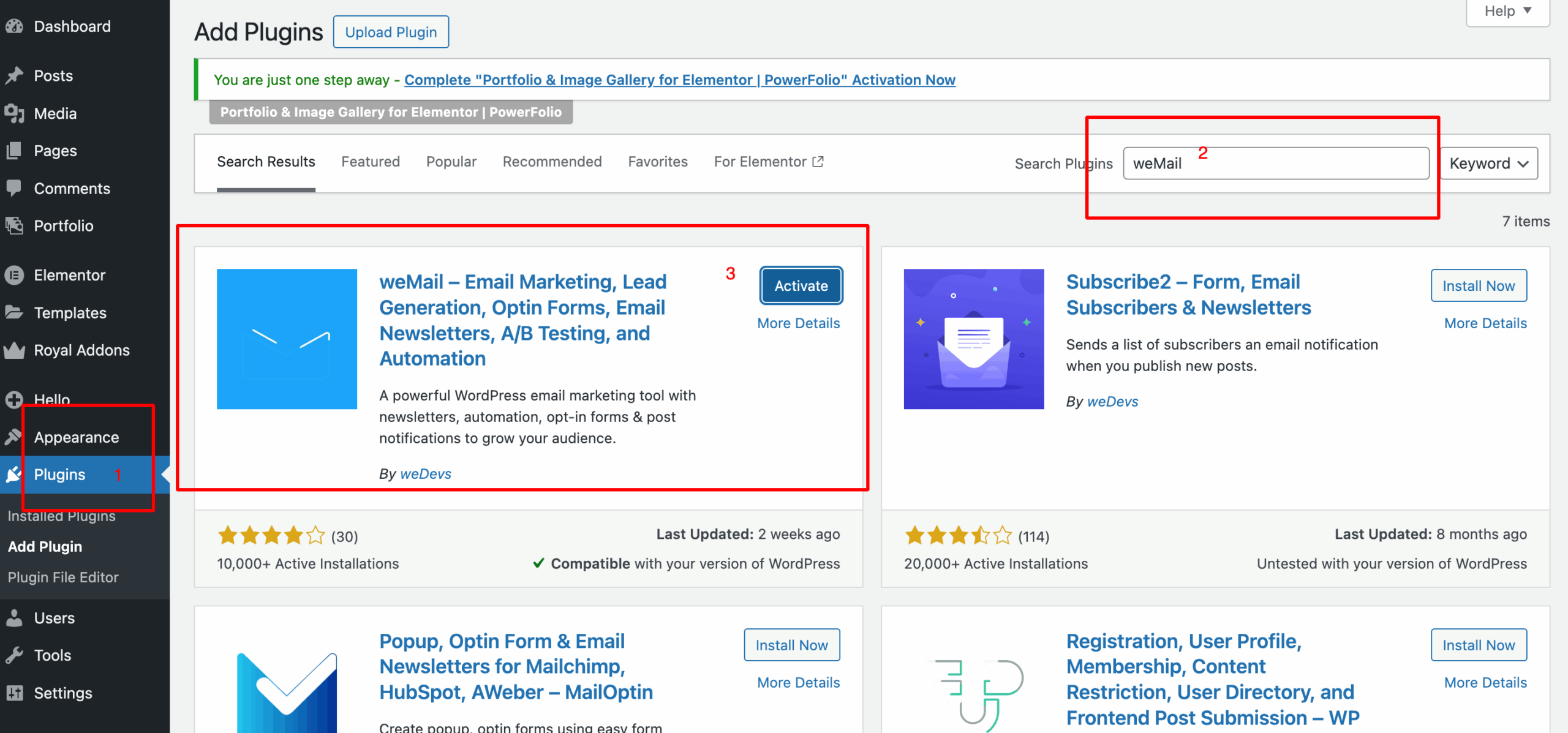
Head to your WordPress dashboard, go to Plugins, search for weMail, and install it directly from WordPress.org. The free version gets you up and running immediately.
Step 2: Connect your sending gateway
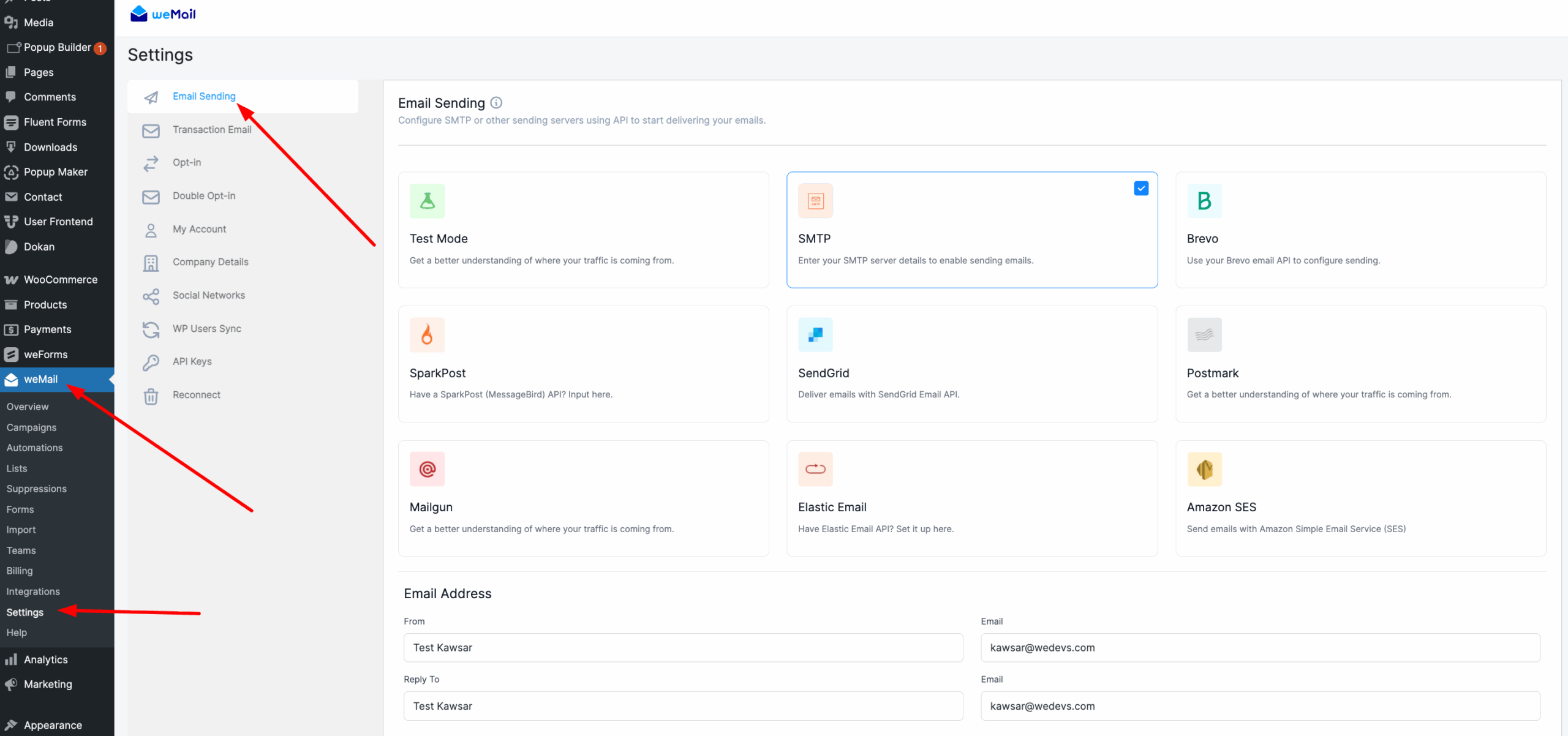
weMail supports 8+ sending gateways including Amazon SES, Mailgun, SendGrid, Postmark, and Brevo. Amazon SES is the most popular choice among WooCommerce store owners because of its rock-solid reliability and remarkably low cost. At $0.10 per 1,000 emails, your sending costs stay minimal even as your list grows.
Step 3: Enable the WooCommerce integration
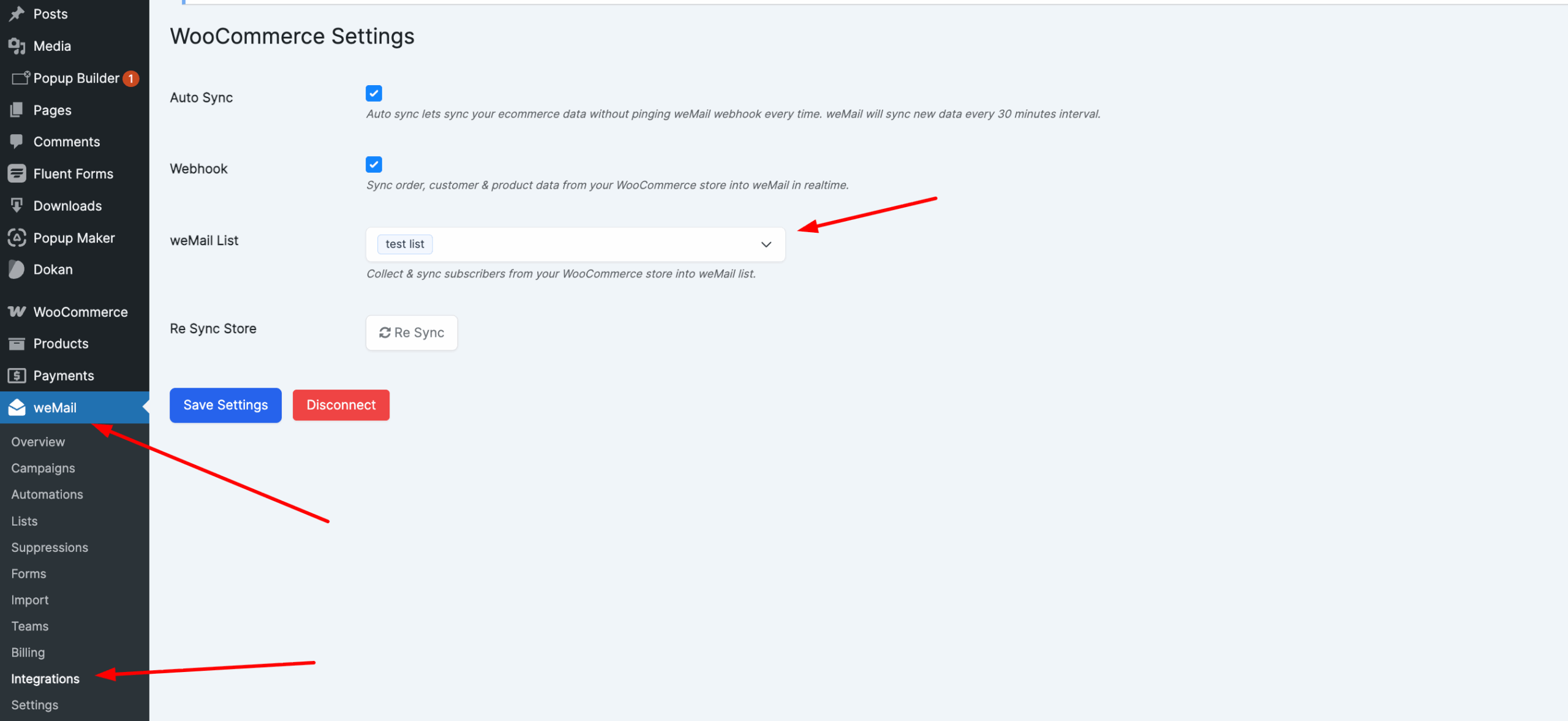
Inside weMail’s settings, toggle on the WooCommerce integration. This is where things get interesting. weMail instantly syncs your entire customer list, pulls in purchase history, and starts tracking order activity in real time. Your existing customers are already in the system the moment this is switched on.
Step 4: Add a checkout opt-in checkbox
One simple toggle inside weMail adds a subscription checkbox to your WooCommerce checkout page. Every customer who opts in joins your list automatically. No extra plugin needed, no custom code required.
Step 5: Set up your first automation
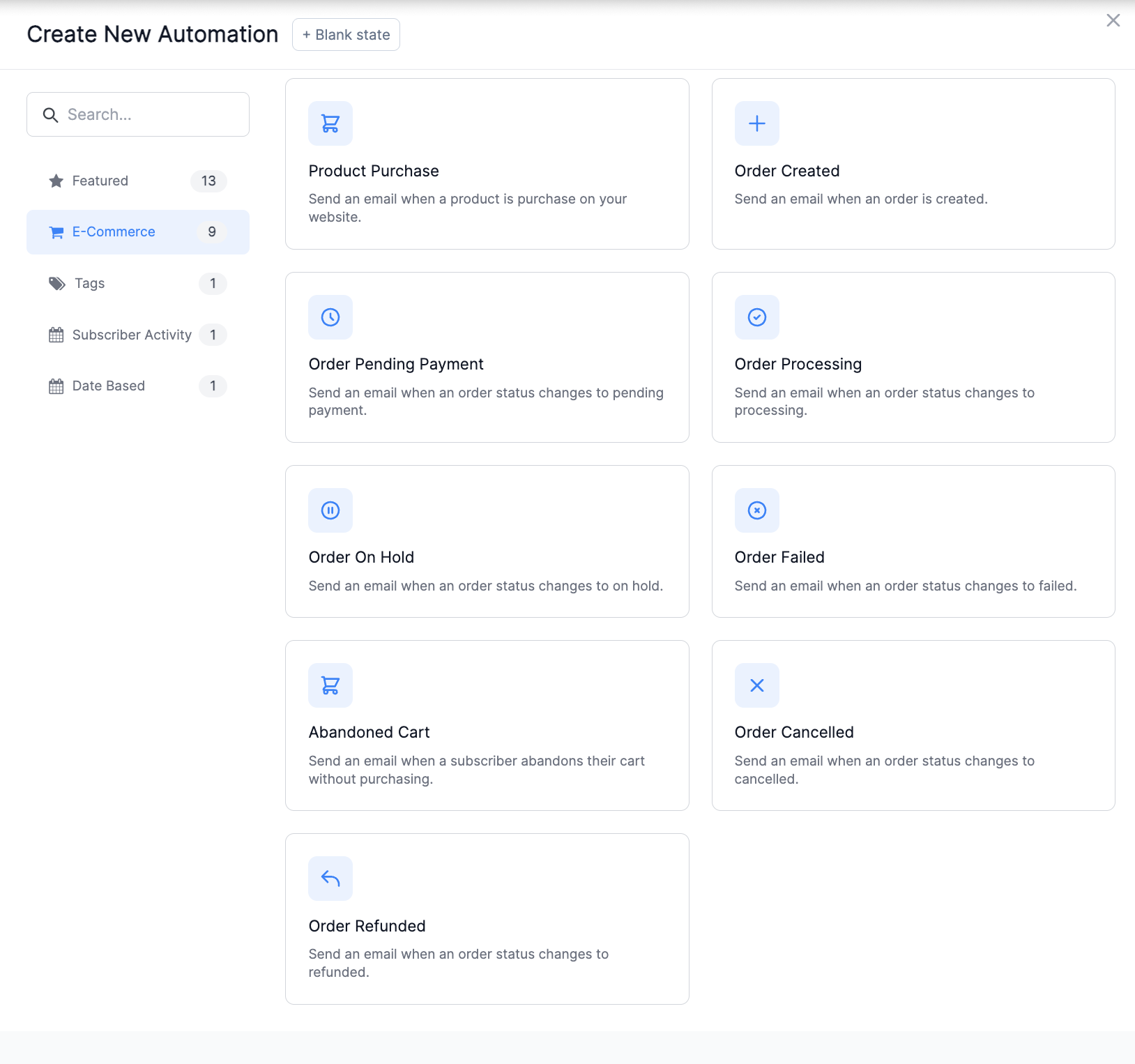
With your list connected and your gateway live, you’re ready to build your first automated workflow. Abandoned cart recovery is the best place to start since it delivers immediate, measurable results.
Worth noting here. weMail’s WooCommerce integration features are part of the premium plan starting at $99 per year. Given everything you get in return, it’s genuinely one of the better value propositions in the WordPress ecosystem.
Building Your Email List From Your WooCommerce Store
A sophisticated automation setup means nothing without a healthy list to send to. The good news is weMail gives you multiple ways to capture subscribers directly from your store without needing separate list-building plugins cluttering up your dashboard.
Start with checkout opt-in
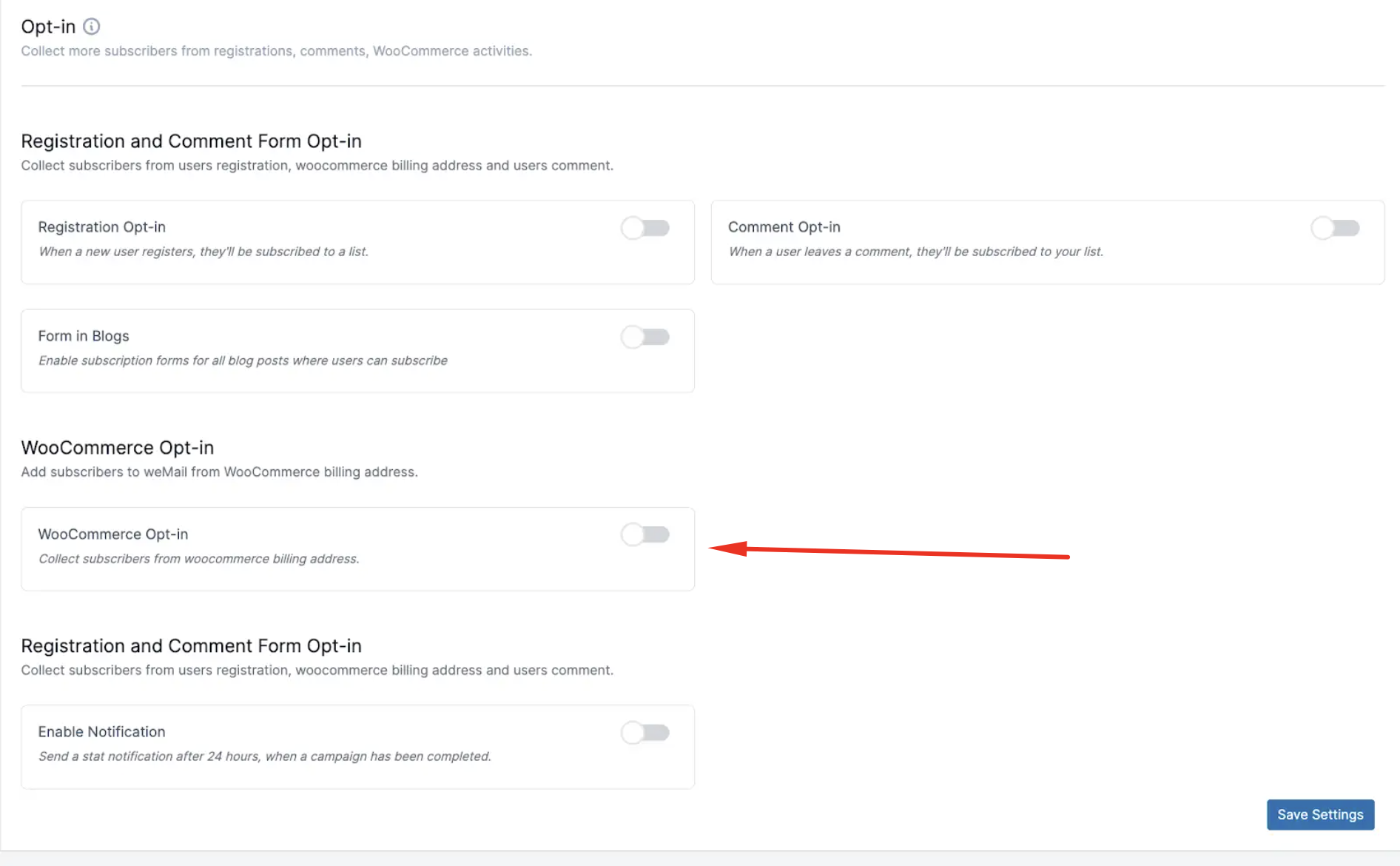
The checkout opt-in checkbox is your most valuable list-building tool and it’s easy to see why. Every person who completes a purchase is already a buyer. They’ve already trusted you with their payment details. When they opt in at checkout, they’re joining your list as customers, not just curious visitors. These subscribers convert at dramatically higher rates than people who signed up through a generic popup.
Use forms strategically across your store
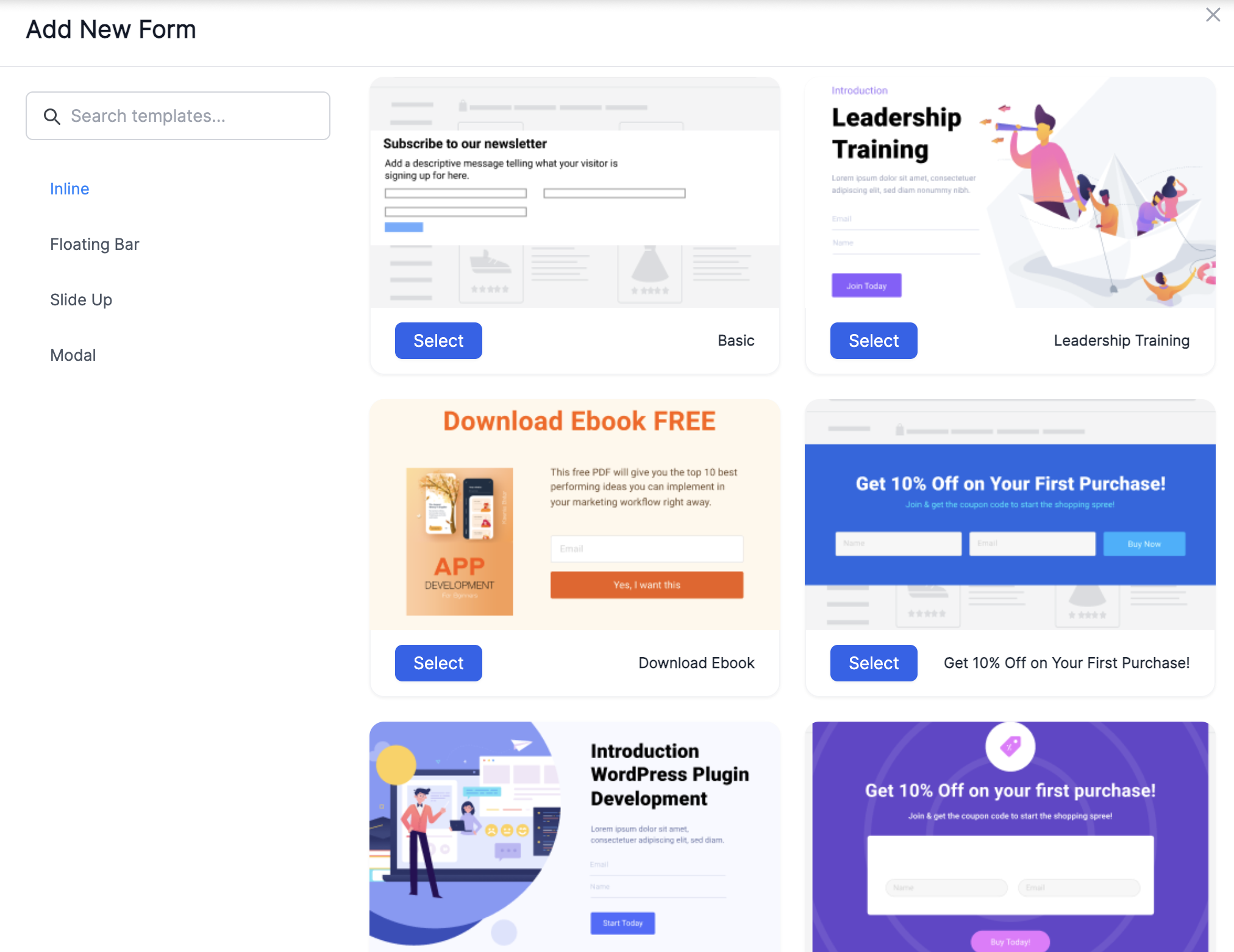
Beyond checkout, weMail gives you four form types to capture subscribers from different parts of your store. Inline forms work well embedded inside product descriptions or blog content. Modal popups can be timed to appear after a visitor has spent some time on a page. Floating bar forms sit persistently at the top or bottom of the screen without interrupting the browsing experience. Slide-up forms appear from the corner and tend to feel less intrusive than full-screen popups.
Each form connects directly to a specific list inside weMail. So visitors landing on your product pages can flow into a different list than people reading your blog. That intentional structure makes your segmentation far more powerful down the line.
Sync your existing WordPress users
Anyone who already has a WordPress account on your site gets added to weMail automatically based on their user role. No manual importing, no spreadsheet exports, no headaches. Your existing audience is already there waiting.
Turn on double opt-in for list quality
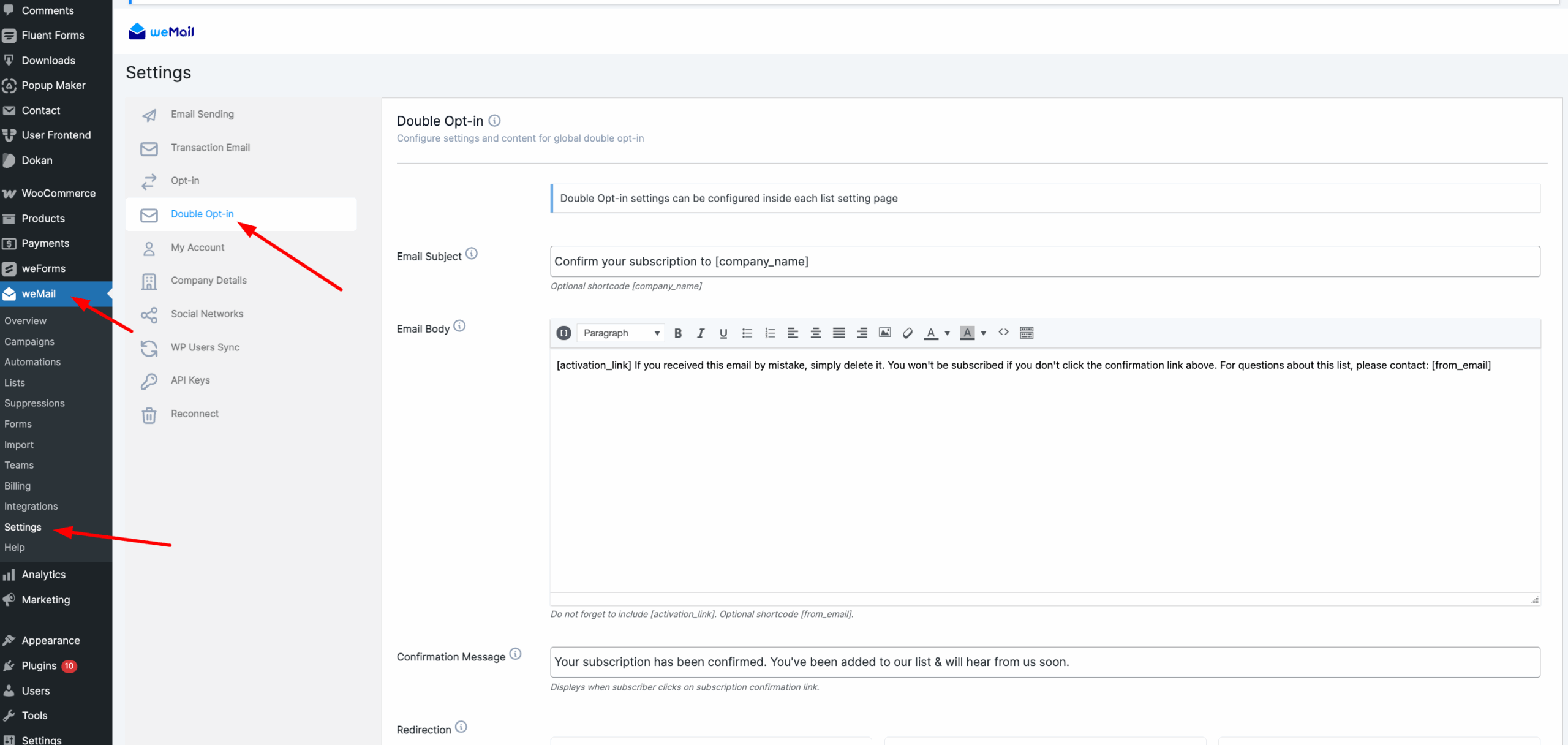
You’ll find that double opt-in produces a smaller but significantly more engaged list. When someone subscribes, they receive a confirmation email before being added. This filters out fake addresses and ensures every subscriber genuinely wants to hear from you. Engaged lists perform better, bounce less, and protect your sender reputation over time.
Essential WooCommerce Email Automation with weMail
This is where weMail earns its place in your store. Automation is what turns email marketing from a time-consuming manual task into a revenue engine that runs quietly in the background while you focus on everything else.
Abandoned Cart Recovery
Let’s start with the most important automation any WooCommerce store can have.
Around 70% of shoppers leave without completing their purchase. Most of them aren’t gone forever. They got distracted, had second thoughts about the price, or simply needed a nudge to come back. A well-timed recovery sequence brings a meaningful percentage of them back.
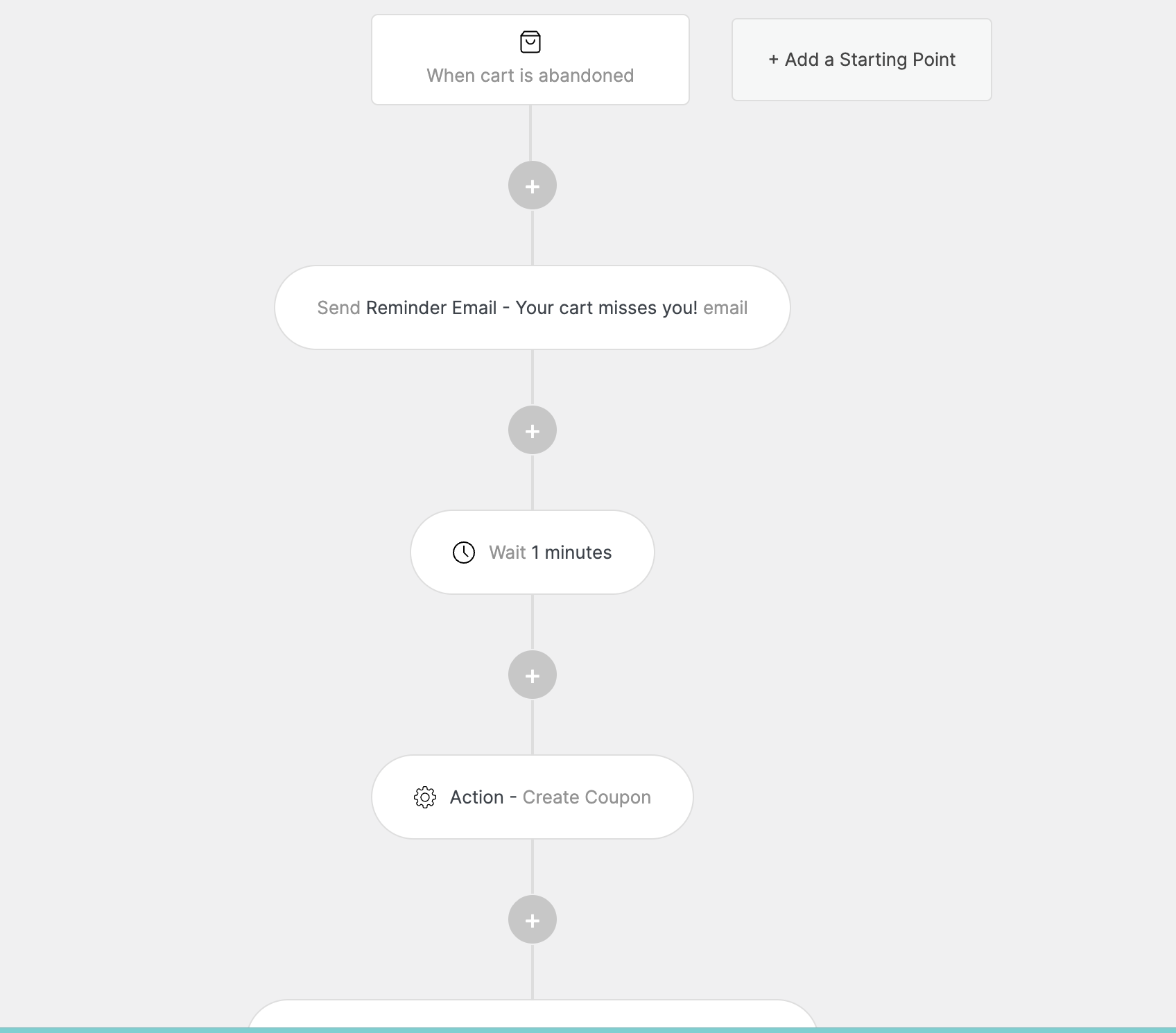
weMail’s v2.1.0 update brought full abandoned cart recovery natively into WordPress. The trigger fires automatically after 30 minutes of cart inactivity. From there you can build a multi-step recovery sequence, include a WooCommerce coupon generated directly inside the automation, and send customers a recovery URL that brings them straight back to their exact cart contents. No friction, no start over experience.
You also get a dedicated cart report showing abandoned, recovered, and lost carts. Carts older than 7 days are automatically marked as lost, keeping your data clean and your reporting accurate.
A practical recovery sequence looks like this:
- Email 1 at 30 minutes: A simple, friendly reminder with cart contents
- Email 2 at 24 hours: Address common objections, include social proof
- Email 3 at 48 hours: A time-sensitive incentive like a small discount coupon
Welcome Series for New Customers
First impressions matter more in email than almost anywhere else. When someone makes their first purchase or joins your list through checkout, the next few emails they receive will define whether they become a repeat customer or a one-time buyer.
A solid welcome series with weMail might look like this:
- Email 1 immediately after purchase: Warm welcome, order confirmation, brand story
- Email 2 on day 3: Getting started tips or product usage guide
- Email 3 on day 7: Your bestsellers with genuine social proof
- Email 4 on day 14: An invitation to your next purchase with a small incentive
The key here is that customers coming through checkout already bought something. They don’t need a first-purchase incentive. They need to feel welcomed and excited about being part of your brand.
Post-Purchase Sequences
The period right after a purchase is one of the highest-engagement windows you’ll ever get with a customer. They’re excited about their order, they’re paying attention to your emails, and they’re open to what comes next.
Post-purchase sequences in weMail can trigger based on specific products or product categories. So a customer who buys a coffee machine gets a how to brew the perfect cup guide on day two, a request for a review on day seven, and a recommendation for complementary coffee accessories on day fourteen. Relevant, timely, and genuinely useful.
Win-Back Campaigns
Customers go quiet. It happens in every store. Someone buys once or twice and then stops engaging entirely. Without a systematic win-back approach, those customers just drift away permanently.
With weMail you can build segments based on last purchase date and target customers who haven’t bought in 60, 90, or 120 days. A simple three-email win-back sequence typically looks like this:
- Email 1 at 60 days: A we miss you message highlighting what’s new in your store
- Email 2 at 75 days: Your best-reviewed products with customer testimonials
- Email 3 at 90 days: A genuine incentive to come back, with a clear expiry date
If someone doesn’t engage after this sequence, it’s worth removing them from your active list. A smaller engaged list always outperforms a large unengaged one.

Subscribe for email
marketing hacks, free
ebooks, and product updates
WooCommerce Order Triggers That Go Beyond the Basics
Most email plugins give you one or two basic order triggers. Something fires when an order is completed and that’s about it. weMail’s v2.0.11 update changed this significantly for WooCommerce store owners.
weMail now supports 8 comprehensive order-based automation triggers, each covering a specific moment in the customer journey. What makes these genuinely powerful isn’t just the number of triggers. It’s the filtering options attached to each one.
Here’s what each trigger does and where you’d realistically use it:
Order Created fires the moment a new order is placed. Use this to send an instant acknowledgment, set expectations around processing time, or deliver product-specific instructions for digital downloads.
Order Processing fires when payment is confirmed and the order moves into processing. This is a great moment to send a personalized thank-you for high-value orders. You can filter this trigger by order value, so customers spending over $200 automatically receive a different, more premium experience than smaller orders.
Order Pending Payment fires when payment is awaiting confirmation. Rather than letting customers wonder what’s happening, you can send a helpful email with payment troubleshooting tips, alternative payment methods, or a gentle reminder to complete the process.
Order On Hold fires when an order is paused, often for verification. Customers find this stressful without context. A clear, reassuring email explaining what’s happening and what to expect next makes a significant difference to the experience.
Order Failed fires when a payment is declined or a system error occurs. Here’s where the filtering gets really useful. You can treat first-time customers differently from returning ones. A first-time buyer who hits a failed payment needs reassurance and guidance. A returning customer who knows your store just needs a quick retry link and perhaps a small incentive.

Order Cancelled fires when a customer cancels. Rather than letting them leave silently, you can trigger a recovery sequence that addresses whatever concern led to the cancellation, or offers an alternative product that might be a better fit.
Order Refunded fires when a refund is processed. Most stores handle refunds transactionally and miss the opportunity to maintain the relationship. A thoughtful refund email that acknowledges the issue, apologizes genuinely, and offers something toward a future purchase can turn a negative experience into a loyal customer.
Product Purchase fires immediately when a specific product or category is purchased. This is your trigger for everything category-specific. Recommendations, care guides, tutorials, and cross-sells all become far more relevant when they’re tied to exactly what the customer just bought.
Every single one of these triggers supports filtering by order value, specific products, product categories, and customer type. That level of precision is what separates weMail’s WooCommerce automation from basic email plugins.
Smart Segmentation That Makes Every Email Feel Personal
Sending the same email to every customer on your list is one of the most common and costly mistakes WooCommerce store owners make. Your customers are not one homogeneous group. They have different purchase histories, different spending levels, different product interests, and different relationships with your brand.
Segmentation is what lets you talk to each of those groups in a way that actually resonates.
weMail’s v2.0.12 update introduced genuinely useful segmentation capabilities that go well beyond basic list splitting. Here’s what you can now do directly inside your WordPress dashboard.
Product Category Segmentation
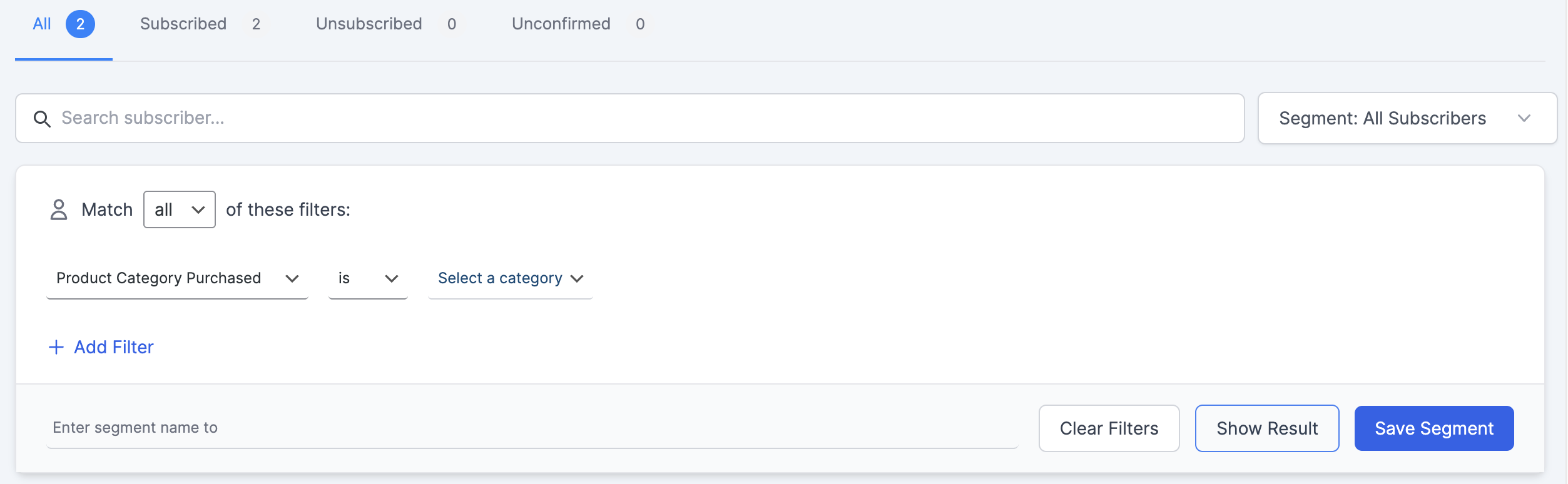
You can now segment subscribers based on the specific WooCommerce product categories they’ve purchased from. This is more powerful than it might sound at first. A customer who consistently buys from your skincare category has completely different interests from someone who only ever buys from your fitness equipment category. Sending category-relevant emails to each group means higher open rates, better click-through rates, and more repeat purchases.
Customer Lifetime Value Tracking
This is the feature that puts weMail in a different league for serious store owners. weMail now tracks four key customer metrics automatically:
- Average order value
- Order frequency
- First purchase date
- Last purchase date
With this data you can build segments that would have previously required expensive enterprise tools. Your VIP customers, those who spend the most and buy most frequently, can be identified automatically and treated to exclusive early access, special offers, or premium support. Meanwhile customers who haven’t purchased in a while get targeted win-back campaigns before they’re lost for good.
Practical Segment Examples
Here are some segments you’ll find genuinely useful to build in weMail:
High-value customers who’ve spent over a certain threshold and purchased more than three times deserve a dedicated VIP experience. New customers within their first 30 days are in a critical trust-building window and need nurturing content rather than aggressive promotions. Customers who bought from a specific category more than once are your best candidates for related product recommendations. Lapsed customers who haven’t purchased in 90 or more days need a win-back sequence before they’re gone permanently.
Building these segments inside weMail takes minutes. And once they’re live, they update automatically as customer behavior changes. Someone who crosses your VIP spending threshold moves into that segment without any manual intervention on your part.
Email Deliverability for WooCommerce Store Owners
You can have the best-written abandoned cart sequence in the world. Perfectly timed, genuinely persuasive, with a compelling offer. But if it lands in the spam folder, none of that matters.
Deliverability is the unglamorous side of email marketing that most store owners ignore until something goes wrong. Here’s what you need to understand.
Why WordPress Default Email Fails
Out of the box, WordPress sends emails using PHP mail. This relies on your web hosting server to deliver emails, and most hosting servers aren’t configured properly for high-volume email sending. The result is emails that bounce, get flagged as spam, or simply never arrive at all.
You’ll find this is one of the most common complaints among WooCommerce store owners who haven’t yet connected a proper sending solution. Customers claim they never received their order confirmation. Cart recovery emails disappear into spam folders. Welcome sequences never reach new subscribers.
The SMTP Solution
SMTP stands for Simple Mail Transfer Protocol. It’s the industry standard for sending authenticated emails that actually reach inboxes. Connecting weMail to a dedicated SMTP gateway completely bypasses the unreliable WordPress PHP mail system.
This is where weMail’s gateway flexibility becomes a genuine competitive advantage. Most WordPress email plugins support two or three gateway options at most. weMail supports nine or more, including Amazon SES, Mailgun, SendGrid, Postmark, Brevo, SparkPost, Elastic Email, and Pepipost, plus any custom SMTP provider.
Why Amazon SES Makes Sense for Most Stores
Amazon SES is the sending gateway most weMail users choose and for good reason. It’s built on the same infrastructure that powers Amazon’s own massive email operations. Deliverability is excellent. Reliability is rock solid. And the cost is genuinely hard to beat at $0.10 per 1,000 emails.
For a WooCommerce store sending four email campaigns per month to a list of 10,000 subscribers, the total sending cost works out to around $4 per month. Combined with weMail’s $99 annual plan, your total email marketing spend for the year comes to roughly $147. That’s the full picture.
List Hygiene Matters Too
Deliverability isn’t just about your sending infrastructure. The quality of your list plays an equally important role. weMail handles bounce management automatically. Hard bounces are removed from your list immediately. Soft bounces are tracked and removed after repeated failures.
Clean lists mean better sender reputation. Better sender reputation means more emails reaching inboxes. It’s a virtuous cycle that compounds over time the longer you use the platform.
A/B Testing Your WooCommerce Emails
Most store owners set up an email sequence, send it, and never touch it again. That’s leaving real money on the table. The difference between a 20% open rate and a 30% open rate on your abandoned cart sequence isn’t just a vanity metric. Across thousands of sends it translates directly into recovered revenue.
A/B testing is how you close that gap systematically. And you’ll find that even small improvements compound significantly over time.
What weMail Lets You Test
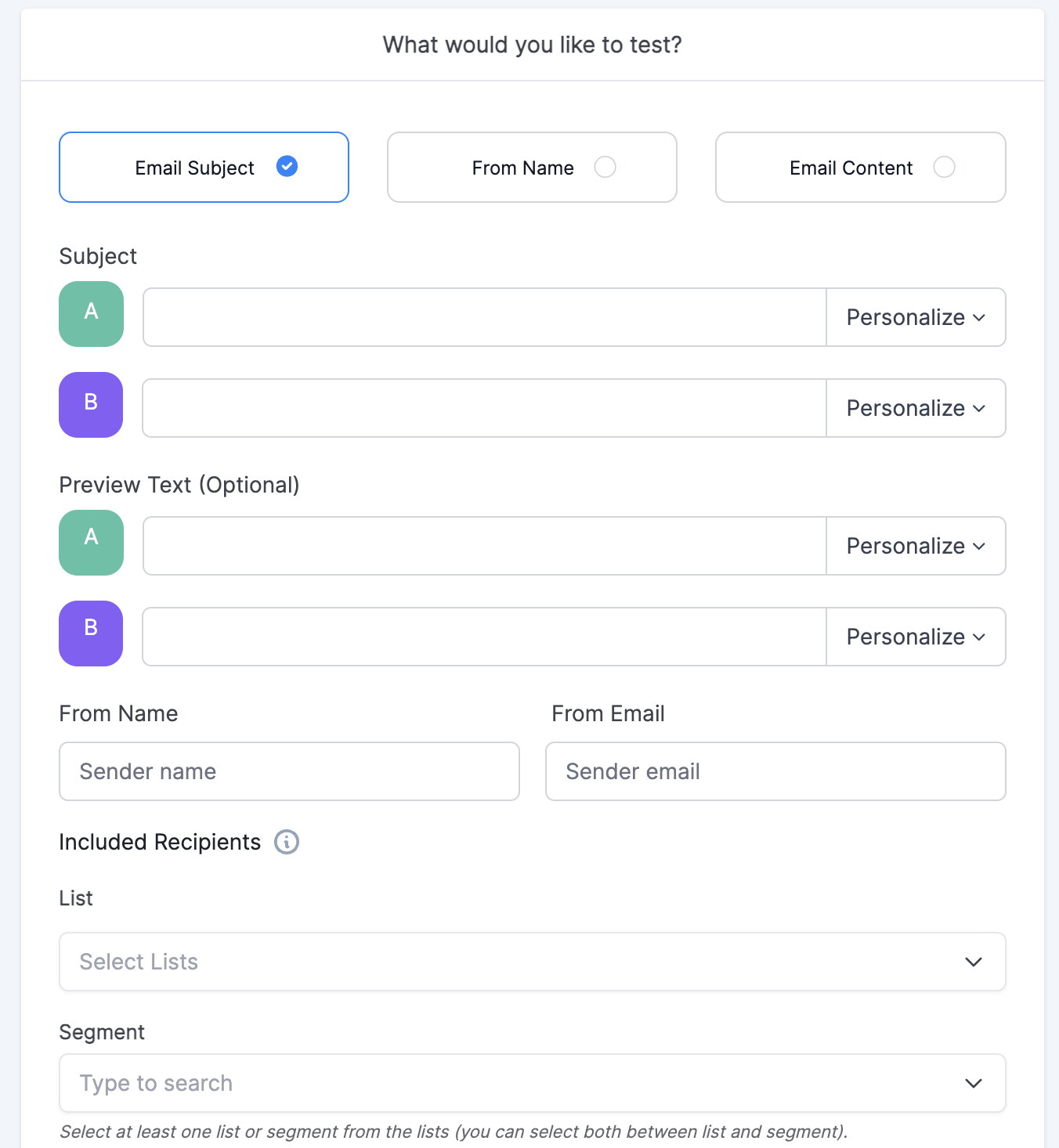
weMail’s built-in A/B testing covers three core elements:
Subject lines are the highest-leverage thing to test because they determine whether your email gets opened at all. A question-based subject line might dramatically outperform a statement. A subject line with the customer’s name might beat a generic one. You won’t know until you test. weMail sends version A to one portion of your list and version B to another, then automatically sends the winning version to everyone else based on open rate performance.
From name testing is something most store owners never think about but it can have a surprisingly large impact. Emails sent from a real person’s name often outperform those sent from a brand name, particularly for smaller stores where the personal touch resonates with customers.
Content testing lets you compare different email bodies, layouts, calls to action, and offers. Should your abandoned cart email lead with the product image or with a benefit-focused headline? Should your discount be 10% off or free shipping? Testing gives you real answers based on your actual audience rather than generic best practices from someone else’s store.
A Simple Testing Framework
Rather than testing everything at once, work through this order:
Start with subject lines since they have the biggest impact on open rates. Once you’ve found a consistently strong subject line formula, move to your call to action button. Then test your offer. Then test your email length. Each test builds on the last and your overall performance improves steadily with every iteration.
One test at a time. One variable at a time. Patience pays off more than trying to optimize everything simultaneously.
Measuring the Success of Your WooCommerce Email Marketing
Sending emails without tracking performance is like running a store without looking at your sales numbers. You need data to know what’s working, what needs fixing, and where your biggest opportunities are hiding.
weMail gives you a built-in analytics dashboard that covers everything a WooCommerce store owner actually needs to track.
The Metrics That Matter
Open rate tells you whether your subject lines and sender name are compelling enough to earn attention. For WooCommerce stores, a healthy open rate on promotional campaigns sits somewhere between 20% and 30%. Automated behavioral emails like abandoned cart sequences and welcome series typically perform significantly higher than that, often reaching 40% to 60% because they arrive at exactly the right moment.
Click rate tells you whether your email content and call to action are persuasive enough to drive action. A low click rate on a high open rate email is a clear signal that something in the body content or offer isn’t landing with your audience.
Conversion rate is the metric that actually connects your email activity to revenue. How many people who clicked actually completed a purchase? This is where Google Analytics integration becomes valuable. weMail connects with Google Analytics and automatically adds UTM parameters to every email link. You can see exactly which campaigns and which automations are generating real sales, not just clicks.
Revenue per email is the number serious store owners focus on most. It cuts through everything else and tells you directly how much each email in your sequence is worth. You’ll find that post-purchase sequences and abandoned cart emails consistently produce the highest revenue per email of any campaign type.
weMail’s Daily Email Digest
One small feature worth highlighting is weMail’s daily email digest. Every morning you receive a summary of the previous day’s email performance delivered straight to your inbox. You don’t have to log into the dashboard to stay on top of what’s happening. The data comes to you automatically.
This is particularly useful for store owners who are managing everything themselves and don’t have time to check analytics dashboards daily. A quick scan of the digest each morning keeps you informed without adding another task to your routine.
How Much Does WooCommerce Email Marketing with weMail Actually Cost?
Let’s talk numbers. Because this is where weMail’s value becomes very difficult to argue with.
Most email marketing platforms price based on how many contacts you have. Your list grows, your bill grows. It sounds reasonable until you actually run the numbers for a store with serious ambitions.
Here’s what the annual cost looks like across the most popular platforms for a store with 100,000 subscribers:
Annual cost for 100,000 subscribers
weMail charges a flat annual fee based on the number of sites, not subscribers. Every plan includes unlimited subscribers and all premium features. Nothing is locked behind a higher tier.
You pair that with Amazon SES for sending. At $0.10 per 1,000 emails, a store sending four campaigns per month to 10,000 subscribers pays roughly $4 per month in sending costs. Your total annual spend sits around $147 for the Starter plan.
Everything covered in this guide comes with the premium plan. Abandoned cart recovery, all 8 WooCommerce order triggers, product category segmentation, customer lifetime value tracking, A/B testing, the full analytics dashboard, Google Analytics integration, and support for 9 or more sending gateways.
There’s also a free version available on WordPress.org if you want to explore weMail before committing. Basic email marketing features are included in the free version. The WooCommerce-specific features unlock when you upgrade to premium.
Is weMail free for WooCommerce?
weMail has a free version on WordPress.org. WooCommerce features like abandoned cart recovery and order automation require the premium plan starting at $99 per year.
How do I set up abandoned cart emails in WooCommerce?
With weMail, you enable the WooCommerce integration, activate abandoned cart recovery, and build your sequence. The trigger fires automatically after 30 minutes of cart inactivity.
Can I do WooCommerce email marketing inside WordPress without a SaaS tool?
Yes. weMail runs entirely inside your WordPress dashboard. No external platform, no monthly SaaS subscription, no data leaving your site.
How do I segment WooCommerce customers by purchase history?
weMail lets you segment by product category purchases, order value, order frequency, and customer lifetime value directly inside WordPress.
Does WooCommerce have built-in email automation?
No. WooCommerce only sends basic transactional emails. For automation like abandoned cart recovery and post-purchase sequences you need a dedicated plugin like weMail.
Your WooCommerce Store Deserves Better Than Default Emails
Most WooCommerce stores are leaving serious money on the table with nothing but basic order confirmations running. No cart recovery. No segmentation. No automation.
weMail changes that. For $99 a year you get everything covered in this guide, unlimited subscribers, and a complete WooCommerce email marketing system that runs entirely inside your WordPress dashboard.
Start with the free version to get a feel for the platform. When you’re ready to unlock the full WooCommerce power, the premium plan is waiting.
Your customers are worth more than a default order confirmation.
Subscribe for email marketing
hacks, free ebooks, and
product updates