




CMO Verdict: How We Manage 1M+ Subscribers with weMail (Case Study)

Building an email marketing tool is one thing. Running your entire business on it is another.
At weDevs, we don’t just sell weMail. We use it to manage email marketing across all our WordPress products. Right now, that means handling more than 1,000,000 subscribers across 10 different product lines.
Millions of emails go out every month. Onboarding sequences run automatically. Upgrade campaigns trigger based on behavior. Segments update as users move from free to paid. A meaningful portion of our revenue depends on these systems working reliably.
If email performance drops, we see it in our numbers.
We’ve tested different tools, dealt with rising costs, and learned what actually works when you’re operating at scale inside the WordPress ecosystem.
In this post, I’ll share
- how we structure our email marketing,
- what changed after switching to weMail,
- the metrics we track, and
- what I’d recommend to any WordPress business managing a large subscriber base.
This isn’t theory. It’s how we run our business. Let’s get started!
Why We Built a New Email Marketing Tool for WordPress
Running a WordPress product company with 10 different products creates unique email marketing challenges. Each product has its own user base. Each user base has different needs. Each need requires different messaging.
Dokan marketplace owners need different emails than WP User Frontend subscribers. HappyAddons users want different content than Klasio course creators.
Before building weMail, we were using Mailchimp. However, we faced several challenges. Let me walk you through the problems we encountered.
Challenge 01 : Our Growth Journey
We didn’t start with 1 million subscribers. Our list grew gradually as our products gained popularity.
New Dokan vendors signed up daily. WP User Frontend users registered. Happy Addons downloads multiplied. Klasio course creators joined. The list kept expanding.
Some subscribers owned just one product. Others owned multiple. Some were free users exploring our plugins. Others were premium customers running serious businesses.
Each product needed its own email strategy. But we all faced the same fundamental problems with Mailchimp.
Challenge 02 : The Cost of Every New Subscriber
We were using Mailchimp to manage our email marketing. As our subscriber list grew, so did our bills.
Mailchimp charges based on contact count. The more subscribers you have, the more you pay. At scale, the costs became unsustainable.
We calculated the numbers. If each product used Mailchimp separately, the annual costs would multiply across every product line. Even with a consolidated account, we faced significant platform costs that kept climbing with our growth.
The pricing model felt broken. Why should we pay more just because our list grows? Growing your list is a sign of business success. It shouldn’t be punished with exponentially higher bills.
Challenge 03: Managing Email at Scale
Each of our products serves different audiences. Dokan users are marketplace owners. Happy Addons users are web designers. Klasio users are course creators.
Most products have their own websites. Dokan operates from dokan.co. Happy Addons from happyaddons.com. weMail from getwemail.io. Each needed its own email setup.
Managing multiple Mailchimp accounts was complicated. Separate logins. Manual template sharing. Constant coordination. No unified view.
We needed a solution that could work independently for each product while remaining affordable and centrally manageable.
Challenge 04 : The WordPress Integration Gap
All our products live in the WordPress ecosystem. Users register through WordPress. They interact with our sites daily.
Mailchimp’s WordPress integration required third-party plugins that often broke after updates. Data syncing wasn’t automatic.
Connecting our sales and user data was complicated. We needed external tools to bridge the gap.
We needed an email marketing solution built specifically for WordPress. One that worked natively with our ecosystem.
Challenge 05 : The Segmentation Bottleneck
Mailchimp has segmentation features. But for a multi-product company like ours, it became a bottleneck.
We needed to segment users by status, engagement, purchase behavior, product usage, and cross-product ownership. Simple enough in theory. In practice? Multiple steps. Clunky conditions. No real-time updates.
Each product team spent hours managing segments instead of creating content. It was a daily headache.
Challenge 06 : The Automation Limitations for WordPress
Mailchimp has automation features. But connecting them to WordPress events was difficult.
We wanted to trigger emails based on:
- Plugin downloads from our website
- WordPress user registrations
- Product purchases
- Product activations
- Support ticket submissions
These triggers required Zapier or custom API work. Each integration was another point of failure. When something broke, campaigns stopped sending.
We needed email automation that understood WordPress natively. Automation that could trigger based on WordPress events without middleware.
Challenge 07 : The Team Collaboration Challenge
Multiple people managed email marketing across our 10 products. Product managers sent updates. Marketing teams ran campaigns. Support teams shared help content.
With separate Mailchimp accounts, collaboration was difficult:
- No easy way to share templates
- No visibility into what other teams were sending
- No coordination on email frequency
The result? A user who owned three products could receive nine emails in one week from different accounts. We had no way to prevent email fatigue.
We needed centralized team management with product-level permissions. One platform where teams could work independently but with visibility and coordination.
Challenge 08 : The Deliverability Control Issue
Mailchimp handles email sending through their infrastructure. We had no control over which gateway was used. We couldn’t switch to Amazon SES or other providers.
As our volume grew, we wanted more control. We wanted to use Amazon SES for cost efficiency. We wanted to monitor our sender reputation directly. We wanted flexibility to switch gateways if needed.
Mailchimp locked us into their infrastructure. If their deliverability suffered, we suffered.
Challenge 09: The Breaking Point
We were spending too much money. Wasting time on manual integrations. Limited by tools that weren’t built for multi-product WordPress businesses.
Each product team struggled with the same problems:
- High costs that kept rising
- Complex WordPress integration
- Difficult multi-product management
- Limited control over sending infrastructure
We had two choices. Keep paying and dealing with these limitations. Or build something better.
We chose to build weMail.
Not just for ourselves. For every WordPress business facing the same challenges. For every product company managing multiple email lists. For every team tired of paying per contact.
We built the email marketing platform we wished existed.

Subscribe for email
marketing hacks, free
ebooks, and product updates
How weMail Solved Our Email Marketing Problems
We built weMail to solve our own problems. Then we put it to work managing our entire email operation across all our products.
The first problem we solved was cost. weMail doesn’t charge per contact. We pay a fixed yearly fee.
For our subscriber volume, the savings are massive. As our list grows, our costs stay the same. Here’s exactly how we use it.
1. Each Product Manages Its Own Email Strategy
Most of our products have their own websites. Each website runs its own weMail instance.
Dokan has its own email list at dokan.co. Happy Addons at happyaddons.com. weMail at getwemail.io. WP ERP, Appsero, weDocs, FlyWP, and Klasio all run independently.
Only two products operate from the main wedevs.com site: WP User Frontend and WP Project Manager.
Why this structure? Each product serves different audiences:
- Dokan users are marketplace owners
- Klasio users are course creators
- HappyAddons users are web designers
They need different content.
Every product team controls their own email marketing. They create segments. They design campaigns. They run automations.
But they all use the same tool. weMail.
2. Smart Segmentation for Targeted Messaging
Segmentation is critical when you manage multiple products. We can’t send the same message to everyone.
Each product creates segments based on user behavior and characteristics. Here are the types of segments we use:
User Status Segments:
- Free users exploring the product
- Trial users testing premium features
- Paying customers using the full version
- Expired customers who didn’t renew
- Long-term loyal customers
Engagement Segments:
- Active users who open emails regularly
- Inactive users who haven’t engaged recently
- Highly engaged users who click every link
- New subscribers in their first 30 days
Purchase Behavior Segments (for WooCommerce-integrated products):
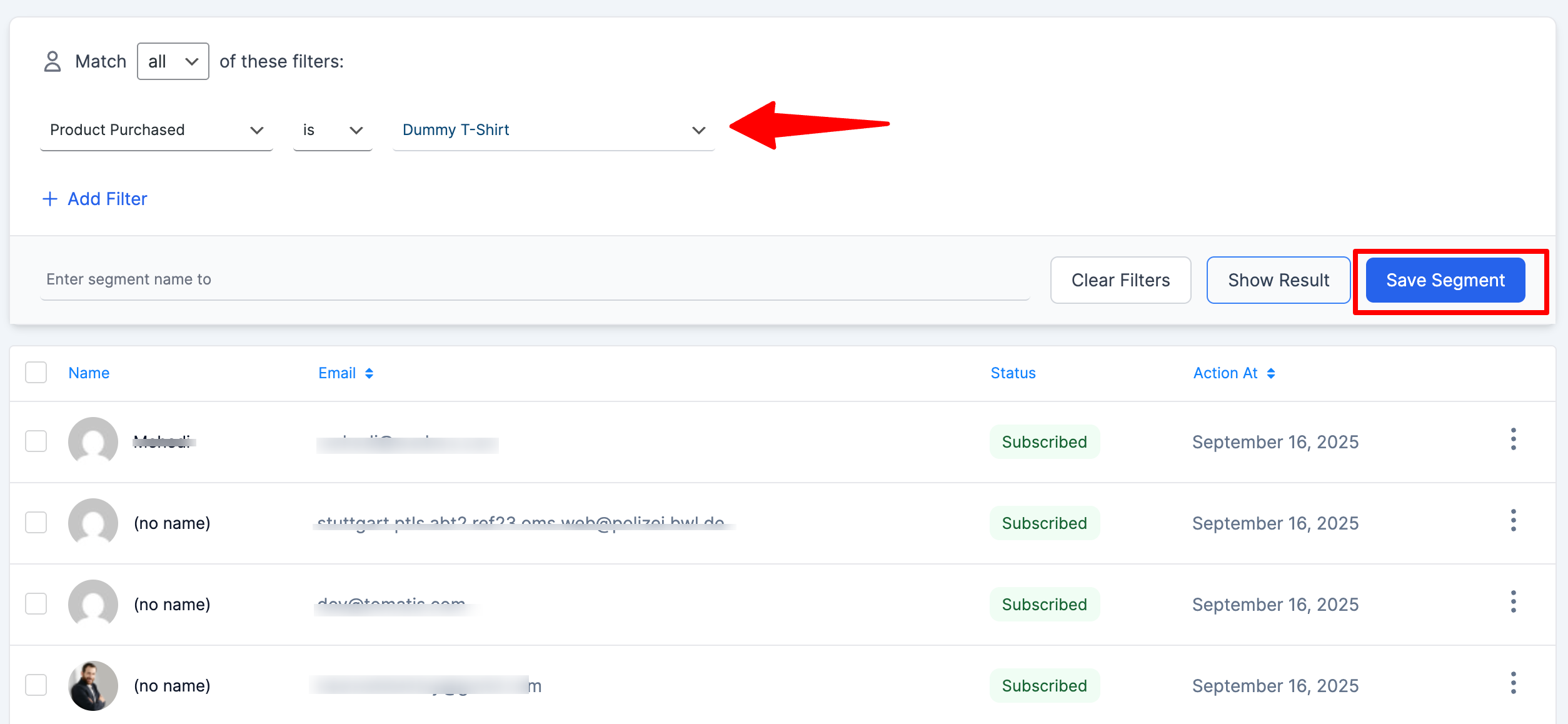
- Customers by total purchase amount
- Recent buyers in the last 30 days
- Customers who bought specific products
weMail’s segmentation builder makes this easy. We set conditions. We combine rules. The system updates segments automatically as user behavior changes.
We don’t manually move people between lists. The segments are dynamic. When someone’s behavior changes, they automatically move to the right segment.
3. Email Automation That Runs 24/7
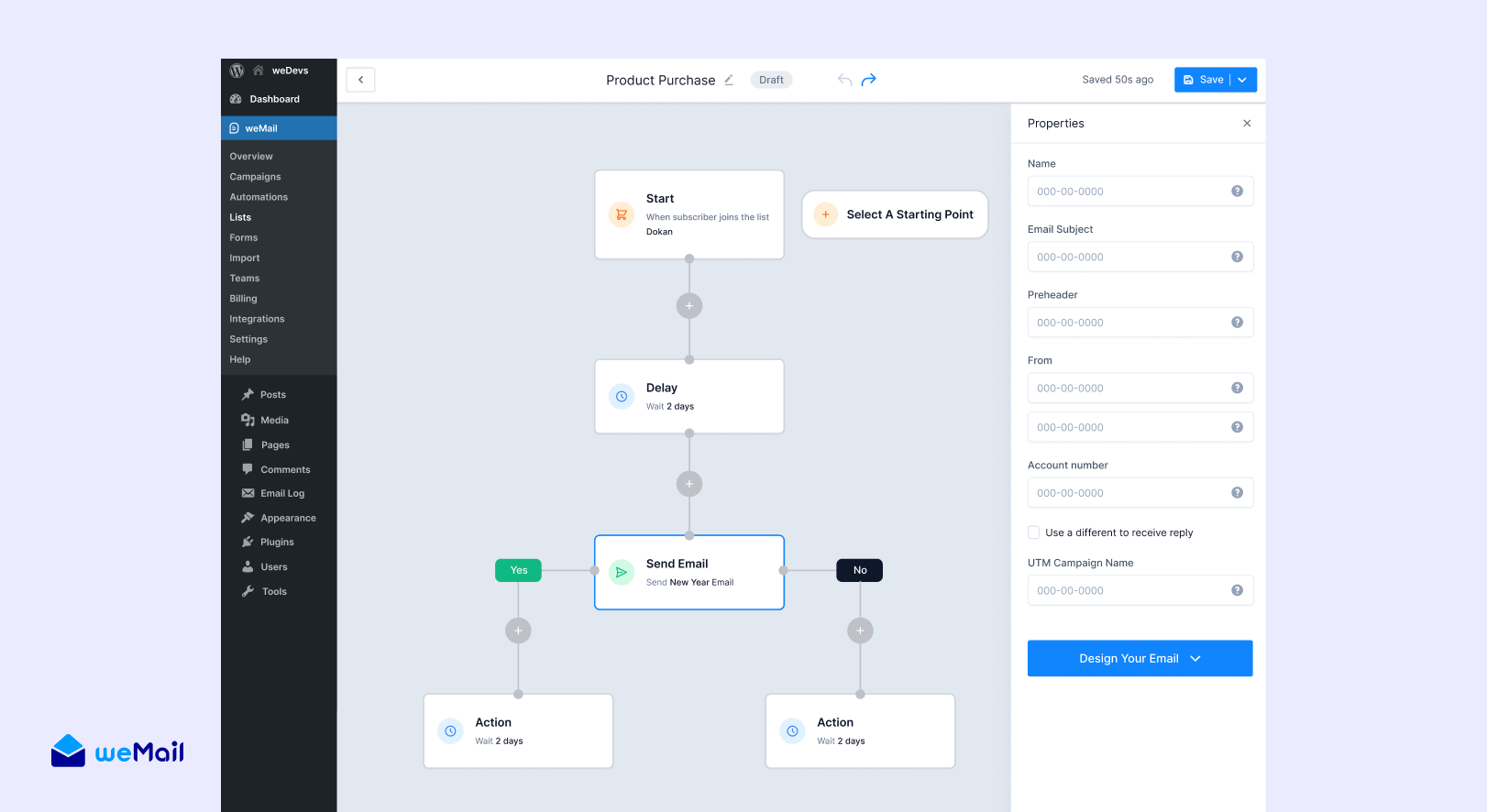
Automation is where weMail saves us the most time. Each product runs multiple automated email sequences. These emails send themselves based on user actions.
a) New User Onboarding Sequences
When someone downloads or purchases a product, they enter an onboarding sequence. The goal is simple. Help them get value from the product quickly.
A typical onboarding sequence includes:
- Welcome email with quick start resources
- Feature introduction emails spread over several days
- Tutorial content and video guides
- Success stories from other users
- Invitation to upgrade (for free users)
The exact timing varies by product. Some products send emails over 7 days. Others spread them over 14 or 21 days. Each team decides what works best for their users.
b) Purchase-Triggered Automations
For products sold through WooCommerce, we trigger automations based on purchases.
When someone buys a product:
- They receive instant purchase confirmation
- A getting started guide arrives shortly after
- Follow-up emails check on their progress
- Advanced tips arrive as they get more experienced
- Feedback requests come at the right time
These automations ensure every customer gets proper onboarding. Our support team doesn’t have to send these emails manually.
c) Engagement-Based Automations
We track how users interact with our emails. Then we respond automatically.
Highly engaged users get:
- Early access to new features
- Invitations to beta programs
When someone stops engaging, they enter a re-engagement sequence. We send different content. We ask what they want to hear about. We give them control over email frequency.
If they still don’t engage, we send a final email: “Do you still want to hear from us?”
No response? We stop emailing them. Clean lists perform better than large lists.
d) Cross-Product Introduction Campaigns
Many users don’t know we have multiple products. When someone uses one product successfully, we introduce them to complementary ones.
Examples:
- A Dokan marketplace owner might benefit from Dokan Mobile App
- A WP User Frontend user might need Happy Addons for design
- A Happy Addons user might want WP Project Manager for client work
We don’t spam these introductions. We wait until users are established with their current product. Then we send targeted, relevant suggestions.
4. Behavioral Triggers for Timely Communication
weMail lets us trigger emails based on specific user actions. When someone takes an action on our website, an email can follow automatically.
Common triggers we use:
- New user registration on the website
- Product download or purchase
- Form submission
- Email link clicks
- Tag additions or removals
These triggers let us respond to user behavior in real-time. Someone downloads a free plugin? Welcome email within minutes. Someone purchases a premium product? Onboarding starts immediately.
5. Automatic Tagging for Better Organization
Tags help us organize subscribers beyond basic segments. We use tags to track:
- Which emails someone has received
- Which campaigns they’ve engaged with
- Their interests and preferences
- Their stage in the customer journey
- Special characteristics or needs
weMail adds tags automatically based on email behavior. Link clicks, email opens, completed actions. All tagged.
These tags feed into our segmentation. We can create segments like “opened welcome email AND clicked pricing link AND hasn’t purchased yet.” That’s a hot lead worth following up with.
6. A/B Testing for Continuous Improvement
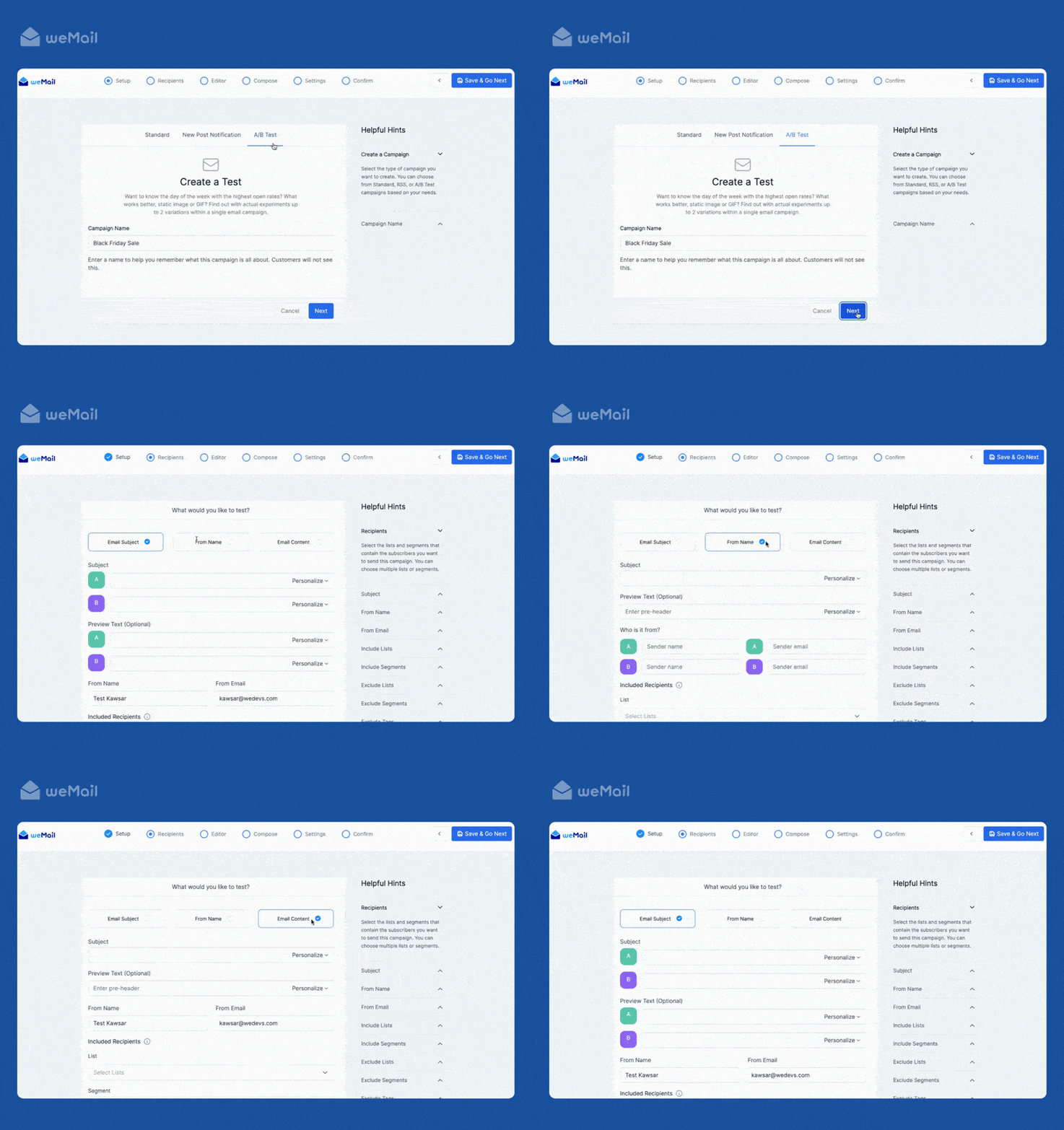
We test everything. weMail’s A/B testing feature makes it simple.
Subject Line Testing: We test two subject lines for every major campaign. weMail sends version A to a small portion of the list, version B to another. After a few hours, the winner goes to everyone else.
What we learned: Personal subject lines outperform generic ones. Questions beat statements. Benefit-focused lines beat feature-focused lines.
From Name Testing: We tested “weDevs Team” versus individual team member names. Personal names won. Now our product managers send emails under their own names.
Content Testing: We test email length, layout, image placement, and CTA buttons. Short emails work better for announcements. Longer emails for educational content. Single CTAs outperform multiple options.
Every test teaches us something. Our performance improves month over month.
7. Lead Collection Forms Everywhere
We use weMail forms across all our websites to capture leads. The form builder is simple. We create forms in minutes.
Form Types We Use:
- Popup forms that appear after a time delay
- Slide-in forms from the bottom corner
- Inline forms embedded in content
- Modal forms for special offers
- Floating bar forms at the top or bottom of pages
Each form connects to a specific email list. Blog readers go to the content list. Pricing page visitors go to the sales list. Documentation readers go to the support list.
We customize forms to match each website’s branding. Colors, fonts, button styles. Visitors don’t feel like they’re interacting with a third-party tool.
8. Seamless WordPress Integration
weMail understands WordPress. It’s built for WordPress. The integration is native and automatic.
Automatic User Sync: Every WordPress user account syncs to weMail automatically. When someone registers on our website, they become a subscriber. No CSV imports. No APIs. It just works.
Comment Opt-In: Blog posts include an opt-in checkbox in the comment form. Someone comments and checks the box? They join our content list automatically.
Purchase Integration: Every purchase syncs to weMail instantly. We capture:
- Customer email
- Products purchased
- Order value
- Purchase date
We can segment customers based on purchase history, trigger automations based on what they bought, and send targeted campaigns to specific customer groups.
Contact Form Integration: weMail integrates with all major form plugins. When someone submits a form, they can be added to an email list automatically.
9. Multiple Email Sending Gateways
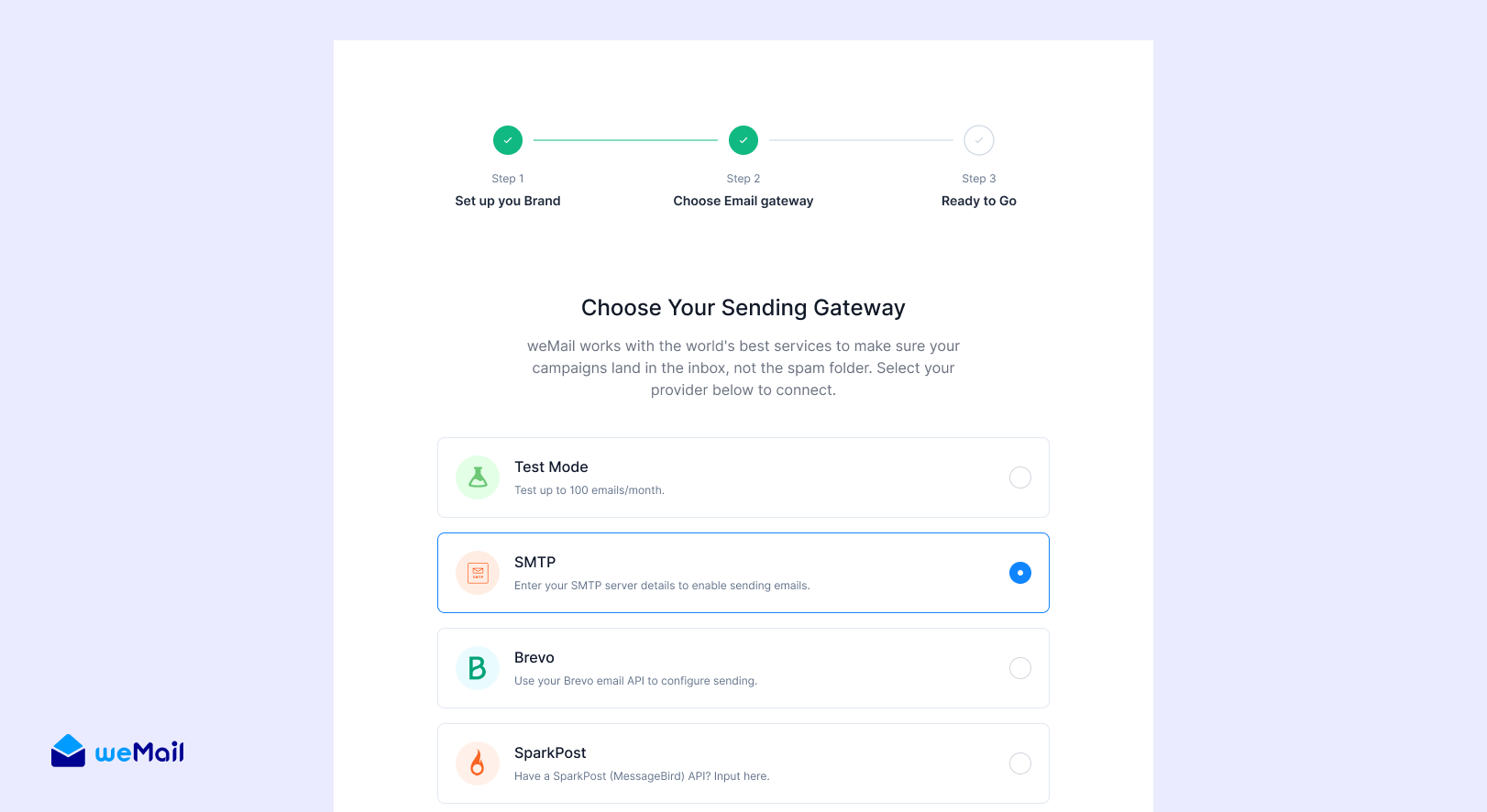
weMail doesn’t send emails itself. It connects to professional email sending services. We use Amazon SES as our primary gateway.
Why Amazon SES?
- Reliable and affordable
- Handles our volume without issues
- Emails reach inboxes consistently
weMail also supports other gateways: SendGrid, Mailgun, SparkPost, Postmark, and more. If we ever need to switch, we can do it in minutes.
We also have SMTP support as a backup.
10. Team Collaboration and Permissions
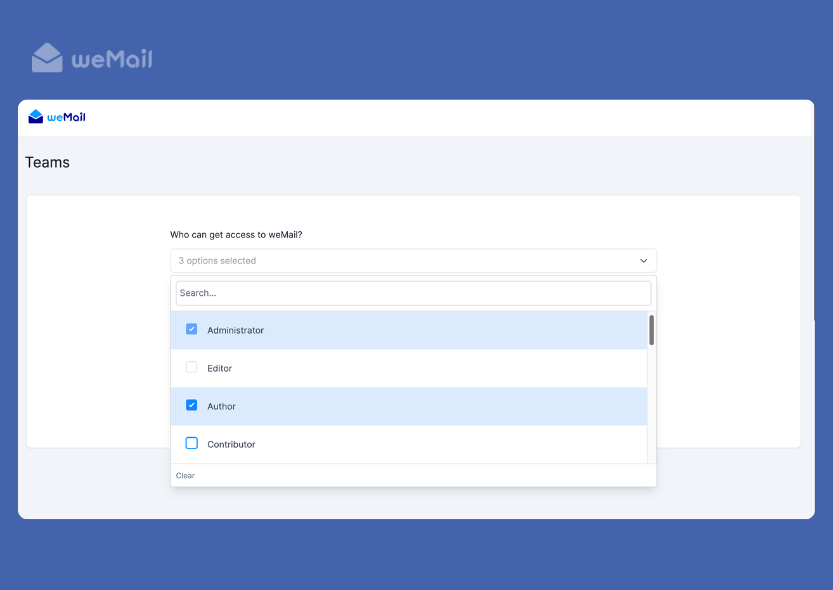
Multiple team members work on email marketing across our products. weMail’s team management keeps everything organized.
We set up role-based permissions: Administrators, Editors, Authors, and Contributors.
The result? Nobody can accidentally send to the wrong list. Nobody can delete important campaigns. Everyone has the access they need and nothing more.
11. Comprehensive Analytics and Reporting
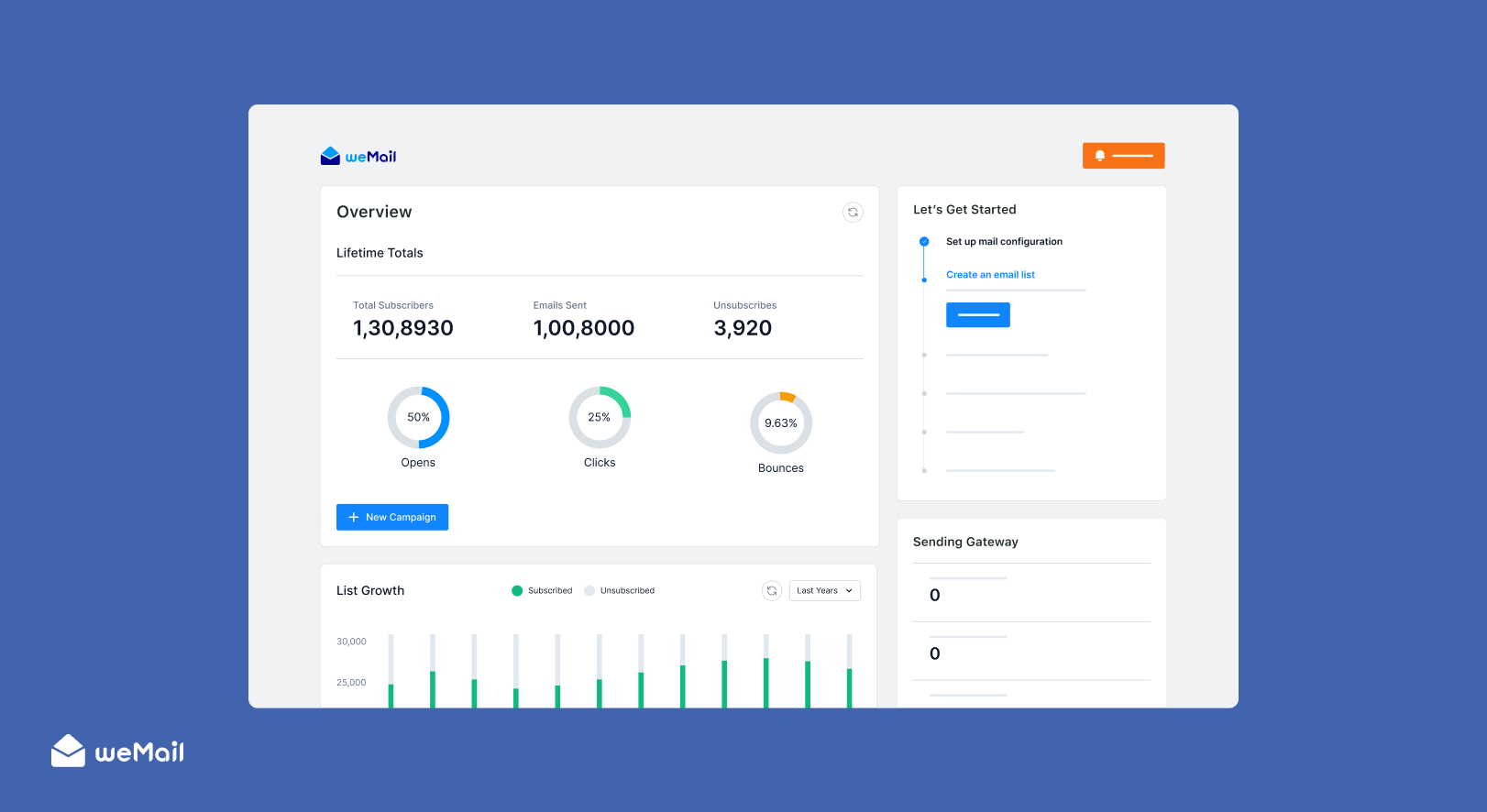
We track every campaign’s performance. weMail provides detailed analytics for:
- Open rates
- Click rates
- Unsubscribe rates
- Bounce rates
- Link-level click tracking
- Geographic data
We can see which emails perform best, which content resonates, and spot problems quickly.
weMail sends us daily email digests. Every morning, we get a summary of yesterday’s performance. The data comes to us.
Google Analytics Integration: We connect weMail with Google Analytics. Every email link includes UTM parameters automatically. We can track email traffic and see which emails drive conversions.
12. Time-Warp Sending for Global Audiences
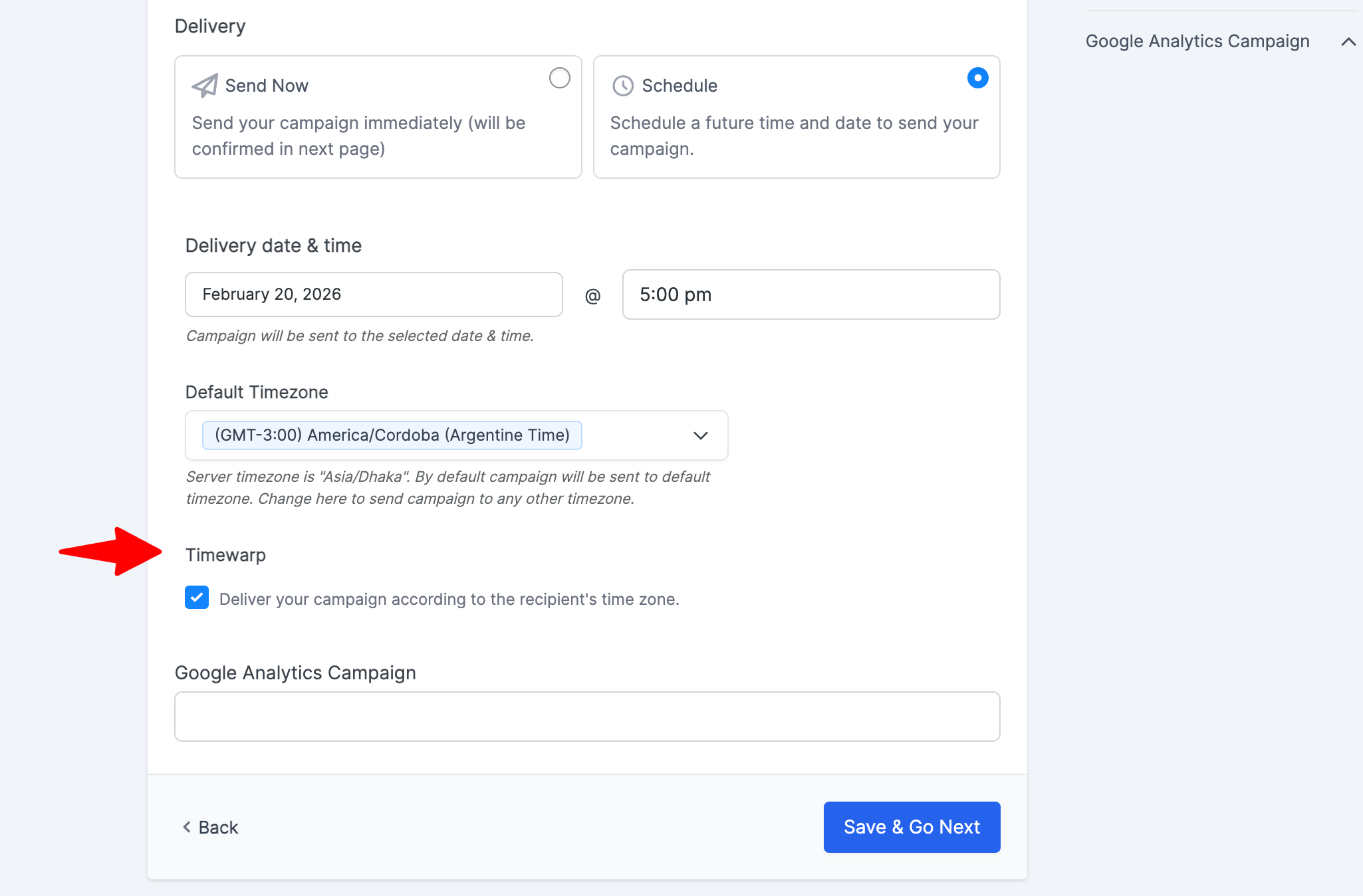
Our users are spread across the world. Sending emails at 9 AM in one timezone means 3 AM in another.
weMail’s time-warp feature solves this. We schedule a campaign for “9 AM,” and it sends at 9 AM in each subscriber’s local timezone.
Someone in New York gets it at 9 AM Eastern. Someone in London at 9 AM GMT. Someone in Tokyo at 9 AM JST.
This improved our open rates significantly. Our emails arrive exactly when they’re most likely to be opened.
13. Double Opt-In for List Quality
We use double opt-in for most of our lists. When someone subscribes, they receive a confirmation email. They must click a link to confirm.
This filters out fake emails and typos. It ensures people actually want to receive our emails. Our lists are smaller but much more engaged.
Double opt-in also helps with deliverability. Email providers trust these lists. Our emails land in inboxes, not spam folders.
14. Automatic List Cleaning
weMail automatically handles bounces. When an email bounces, the system marks it. Hard bounces are removed automatically. Soft bounces are tracked and removed after multiple failures.
We don’t have to manually clean our lists. weMail keeps them healthy automatically. This protects our sender reputation.
The Result: A Scalable Email System
weMail handles 1,000,000+ subscribers across our 10 weDevs products without breaking a sweat. Each product team operates independently, uses the features they need, and runs their own strategy.
But we all benefit from the same powerful platform. We all save money compared to traditional email tools. We all have access to advanced features. We all can scale without worrying about costs.
Most importantly, weMail proves itself every day. It’s not just a product we sell. It’s the tool I trust to run our business.

The Impact: Real Numbers from Real Campaigns
We didn’t just build weMail and hope it would work. We tested it with our actual business. We tracked everything. The numbers tell a compelling story.
1. Massive Cost Savings
The financial impact was immediate and significant.
Before weMail, traditional platforms charged us based on contact count. As our subscriber base grew, so did our bills. Managing each product separately would have meant multiple accounts, each with climbing costs. Even a consolidated account meant substantial annual fees that increased with our growth.
With weMail, the cost structure changed. We pay a fixed yearly fee for the platform, regardless of subscriber count. For delivery, we use Amazon SES, which charges based on emails sent, not contacts stored.
The savings are substantial. We redirected those resources to:
- Content creation
- Better support staff
- Faster product improvements
- Marketing experiments we couldn’t afford before
As our list continues to grow, traditional platforms would charge us more. With weMail, our costs remain predictable.
2. Improved Email Performance
Our email metrics improved significantly after switching to weMail. Better segmentation and automation drove better results.
Open Rates: Our average open rate across all products is 24%. Industry benchmarks for B2B software sit around 21-22%. Our best-performing campaigns hit 29% with highly segmented audiences and time-warp sending.
Click Rates: Our average click-through rate is 3.1%. The industry average for B2B software is around 2.3%. Automated onboarding sequences perform even better at 4.1%.
Conversion Impact: Email-driven conversions improved by 27% after we implemented proper segmentation and automation. We track conversions from email to product trials, purchases, and upgrades.
Our automated cross-sell campaigns show strong results. When we introduce users to complementary products, a meaningful percentage take action.
Unsubscribe Rates: Our unsubscribe rate is 0.3%. The industry average is around 0.5%. Better segmentation means more relevant emails. People stay subscribed because they want our content.
3. Time Saved Through Automation
Automation eliminated countless hours of manual work.
Before weMail, our product teams spent significant time each week on email marketing tasks:
- Writing emails
- Manually segmenting lists
- Scheduling sends
- Tracking results
4. Faster Campaign Execution
Creating and launching email campaigns became significantly faster.
Before weMail, launching a campaign was time-consuming:
- Export lists from WordPress
- Import them to the email platform
- Create segments manually
- Design emails in clunky editors
- Test everything
- Schedule sends
With weMail, we launch campaigns much faster. Lists sync automatically. Segments update in real-time. The email builder is intuitive. Testing is built-in. Scheduling is simple.
The result? We can respond to opportunities faster. Product launches happen smoothly. Time-sensitive announcements go out quickly. We’re more agile.
5. Better List Health and Deliverability
Our email deliverability improved noticeably after switching to weMail.
Automatic bounce handling keeps our lists clean. Double opt-in ensures quality subscribers. Regular engagement tracking identifies inactive users.
Our bounce rate dropped to 0.4%. The industry average is around 2%. Clean lists mean better sender reputation. A better reputation means more emails reach inboxes.
Our spam complaint rate is below 0.05%. We send relevant, wanted emails. People don’t mark us as spam because they actually want to hear from us.
6. Increased Revenue from Email Marketing
Email became a more significant revenue driver for our business.
We track revenue attributed to email campaigns. After implementing weMail’s advanced features, email-driven revenue increased significantly year over year.
Automated sequences contribute meaningfully:
- Onboarding sequences convert free users to paid customers
- Re-engagement campaigns bring back inactive users
- Cross-sell campaigns generate additional revenue from existing customers
Email marketing is now one of our highest-ROI marketing channels.
Real Success Stories from Our Products
Let me share specific examples of how different products use weMail successfully.
1. Dokan’s Vendor Onboarding Success
Dokan implemented a 14-day automated onboarding sequence for new marketplace owners. The sequence teaches them how to set up their marketplace, add vendors, and launch successfully.
Before automation, only 23% of new Dokan users completed basic setup. After implementing the automated sequence, that number jumped to 61%. More users get value from the product faster.
The sequence includes:
- Day 1: Welcome and quick start guide
- Day 3: Vendor management tutorial
- Day 5: Payment gateway setup help
- Day 7: Marketing tips for marketplace owners
- Day 10: Success story from another marketplace
- Day 14: Invitation to join the Dokan community
This automation runs continuously. Every new user gets personalized guidance without any manual work from the team.
2. HappyAddons’ Upgrade Campaign Win
HappyAddons ran an A/B test on their upgrade campaign for free users.
Version A focused on features:
- Subject line: “Unlock 143+ Widgets”
- Email listed all premium features
Version B focused on outcomes:
- Subject line: “Build Client Websites 3x Faster”
- Email showed how premium features save time and make money
Version B won decisively. Open rates, click rates, and conversions all performed significantly better.
The lesson was clear. Users care more about results than features. Happy Addons applied this insight to all future campaigns, and their upgrade conversion rate improved substantially.
3. Klasio’s New User Engagement

Klasio faced a challenge. Many users signed up but never engaged with their welcome emails. The product team wanted to increase activation.
They created an engagement-based automation. When someone signed up but didn’t open the welcome email within 48 hours, they received a targeted follow-up sequence.
The sequence included:
- Hour 48: “Did you miss this?” resending key getting-started content
- Day 4: “See how others use Klasio” with video examples and success stories
- Day 7: “We’re here to help” with direct support contact and live chat invitation
The automation increased email engagement by 43%. More users opened emails and clicked through to the platform. Engaged users are much more likely to become active course creators and paying customers.
4. WP ERP’s Re-engagement Campaign
WP ERP noticed a segment of users who stopped engaging after 60 days. No opens. No clicks for months.
The team created a re-engagement campaign with an honest, direct approach.
Subject line: “Should we keep sending you emails?”
The email:
- Acknowledged the lack of engagement
- Offered valuable content
- Asked users to click if they wanted to stay updated
- Included a clear unsubscribe link
The results were telling. 31% of inactive users opened and clicked to re-engage. 47% unsubscribed.
The unsubscribes were actually positive. Those users weren’t engaging anyway. Removing them improved list health. The re-engaged users started opening emails again. Overall engagement metrics improved significantly.
5. FlyWP’s Time-Warp Sending Impact
FlyWP serves users across the globe. Developers in the US, Europe, Asia, and Australia all use the platform.
Initially, FlyWP sent all emails at 9 AM US Eastern time. That meant European users received emails in the afternoon. Asian users got them late at night. Australian users saw them in the early morning.
After implementing time-warp sending, emails arrived at 9 AM in each user’s local timezone. The impact was immediate.
Open rates increased by 28%. Click rates improved by 19%. Users engage more when emails arrive at convenient times.
6. weDocs’ Documentation-Driven Conversions
weDocs integrated email signup forms into their documentation pages. When someone read documentation, they could subscribe for updates and tips.
These subscribers were highly qualified. They were actively using the product. They wanted to learn more.
weDocs created a specialized email sequence for documentation subscribers. The emails provided:
- Advanced usage tips
- Lesser-known features
- Integration guides
- Workflow optimization ideas
These subscribers converted to paid plans at 3x the rate of regular subscribers. They were already engaged with the product. The emails helped them get even more value.
My Verdict: Would I Recommend weMail to Other WordPress Business Owners?
When we started building weMail, we had one goal: create the email marketing platform we wished existed. Built for WordPress businesses. Priced to reward growth, not punish it.
But building a product is one thing. Using it to run your business? That’s the real test.
We put weMail to work managing 1,000,000+ subscribers across our 10 weDevs products. Millions of emails. Every feature tested. No holding back.
What we learned:
Cost matters. Simple pricing. Affordable pricing. Companies need features that work and prices they can afford.
Segmentation is everything. Right message. Right person. Right time. Everything else follows.
Automation saves more than time. It saves consistency. Never forgets. Never gets tired. Same quality experience, every subscriber, every time.
WordPress integration isn’t optional. Users want tools that fit their workflow. Native integration matters.
The results? Costs dropped significantly. Engagement improved. Time saved. Revenue increased.
So, would I recommend weMail?
Yes. And I say that as someone who actually runs their business on it.
We manage over a million subscribers across 10 products using weMail. Not as a test. Not as a demo. As our actual email marketing operation. If it didn’t work, we’d know immediately. We’d see it in our open rates, our conversions, and our revenue.
If you run a WordPress business and email marketing matters to you, the answer is weMail.
Subscribe for email marketing
hacks, free ebooks, and
product updates